Your therapy website often gives a prospective client their first impression of you — and the headshot does most of the work. This guide walks through exactly how to prompt an AI headshot that reads as warm and credible on a therapy site, what details matter most, and what to avoid.
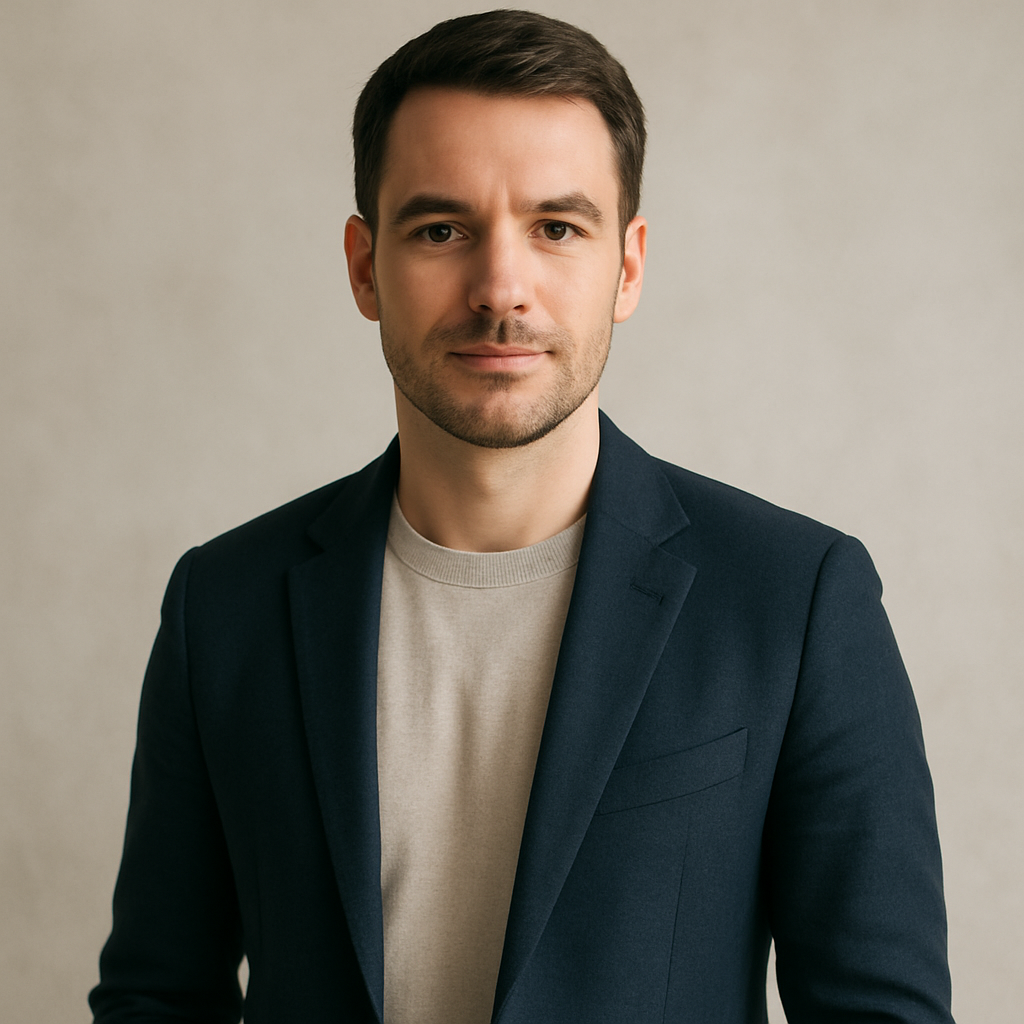
Quick answer: An AI headshot for a therapist website works best when it prioritizes soft lighting, a calm expression, and a natural background over slick studio polish. Describe your real appearance, the mood you want to convey, and the setting your clients associate with you. Generate a few variations, pick the one that feels most like you, and you're done — no subscription, no photo session required.
What Makes a Therapist Headshot Different From a Standard Professional Photo
A therapist headshot needs to feel safe before it feels impressive. Corporate headshots optimize for authority — sharp contrast, formal attire, direct gaze. A therapy headshot optimizes for something harder to define: the sense that this person is calm, present, and easy to talk to.
The practical differences:
- Lighting: Soft and diffused wins over dramatic. Think window light, not studio strobes.
- Background: Warm neutrals, soft greens, or blurred indoor settings feel more grounded than plain white or grey backdrops.
- Expression: A relaxed, natural smile (or a calm, attentive expression without a smile) reads better than a posed grin.
- Attire: Business casual or smart casual usually fits better than a formal suit — unless your practice specifically serves corporate clients.
- Posture: Slightly turned, relaxed shoulders signal openness rather than tension.
None of this requires a photographer. It requires a well-written description.
How to Write a Prompt That Gets the Right Result
The more specific your description, the closer the first image will be to what you want. Vague prompts produce generic results. Specific prompts produce images that actually feel like you.
Work through these four elements before you type anything:
1. Your Appearance
Describe your gender presentation, approximate age range, hair color and length, and any distinctive features. Don't be vague — "a woman in her 40s with shoulder-length brown hair and glasses" is far more useful than "a female therapist."
2. The Mood You Want to Convey
Choose one or two words: warm, calm, approachable, trustworthy, grounded. Use them in the prompt. The generator responds to emotional tone as well as visual description.
3. Lighting and Background
Soft window light, golden hour indoor light, and overcast natural light all work well. For backgrounds: a blurred bookshelf, a neutral wall in sage or warm grey, or a softly lit office corner all read as therapy-appropriate.
4. What to Wear
Describe a specific outfit, not just "professional clothes." "A soft teal wrap top" or "a navy blazer over a white shirt" gives the generator something to work with.
Here's a complete prompt you can copy and adapt:
Example prompt: "Professional headshot of a woman in her late 30s, warm smile, shoulder-length auburn hair, wearing a sage green wrap blouse. Soft natural window light from the left. Slightly blurred warm-toned neutral background, like an office or therapy room. Calm, approachable expression. High-quality portrait photography style."
Generate three or four variations with small adjustments — change the background, try a different expression note, or swap the light direction — and compare them side by side.
Common Mistakes to Avoid
The most common mistake is prompting for polish instead of warmth. A hyper-sharp, high-contrast image that looks like a LinkedIn photo for a finance executive sends the wrong signal on a therapy website.
Watch out for these:
- Over-styled hair or makeup descriptions — keep it natural and realistic
- Dramatic lighting keywords like "studio lighting," "high contrast," or "dramatic shadows" — these create images that feel cold
- Backgrounds that are too clean — a pure white background reads as clinical or corporate, not therapeutic
- Generic descriptors — "professional woman" produces generic results; be specific about who you actually are
- Requesting an expression that doesn't match your practice — a very formal, unsmiling headshot on a site for anxiety therapy creates dissonance before a client ever reads a word
Matching the Headshot to Your Website's Feel
Your headshot should look like it belongs on your specific site, not just any therapy site. A somatic therapist's website often has a different visual tone than a CBT practice focused on career professionals — and your photo should match.
Before generating, spend two minutes looking at your site's color palette, fonts, and overall mood. If your site is warm and earthy, describe a warm-toned background. If it's clean and minimal, a soft grey or white-adjacent background works. If you specialize in trauma-informed care, extra warmth and softness in the lighting matters even more.
This alignment between headshot and site is what makes the overall impression feel cohesive and considered — which, for a therapist, signals that you pay attention to detail in your work too.
Generate your therapist headshot →
How the Cost Compares to a Photography Session
A professional headshot photographer typically charges $150–$400 for a session, plus editing time and turnaround. That's reasonable for a full shoot — but not always practical for a single image update, a second location, or a seasonal refresh.
| Option | Typical cost | Commitment | |---|---|---| | Professional photographer | $150–$400 per session | Scheduling, prep, wait for edits | | Midjourney subscription | $10/month (~$0.07/image if you use it heavily) | Monthly charge whether you create or not | | ATXP Pics | A few cents per image | No subscription, balance never expires |
At ATXP Pics, you pay only for the images you generate. If you create five headshot variations and pick one, you've spent cents — not a monthly fee that charges you even months you don't create anything.
When an AI Headshot Is (and Isn't) the Right Call
An AI headshot is a strong choice when you need something professional quickly, are updating your site between photo sessions, or want to test different looks before committing to a photographer.
It works especially well if:
- You're launching a new practice and need a site up before you can book a photographer
- You want a second headshot for a specific page (blog author photo, directory listing)
- Your current photo is outdated but your next shoot is months away
It's worth pausing if:
- Your existing professional photos are recent, high-quality, and already feel like you
- Your practice serves clients who may specifically value authenticity around real-world photography
For most therapists updating or launching a site, a well-crafted AI headshot hits the right balance of approachability, professionalism, and speed.
A therapist website headshot isn't about looking impressive — it's about looking trustworthy and human. Describe your appearance specifically, lead with warmth in every detail of the prompt, and generate a few variations until one feels right.