Most AI headshots fail before they're even generated — because the prompt is too vague. "Professional headshot of a woman in her 30s" produces exactly the over-smoothed, symmetrical, plastic result you're trying to avoid. This guide covers the specific prompt techniques that produce an AI headshot that doesn't look fake, broken into the elements that matter most.
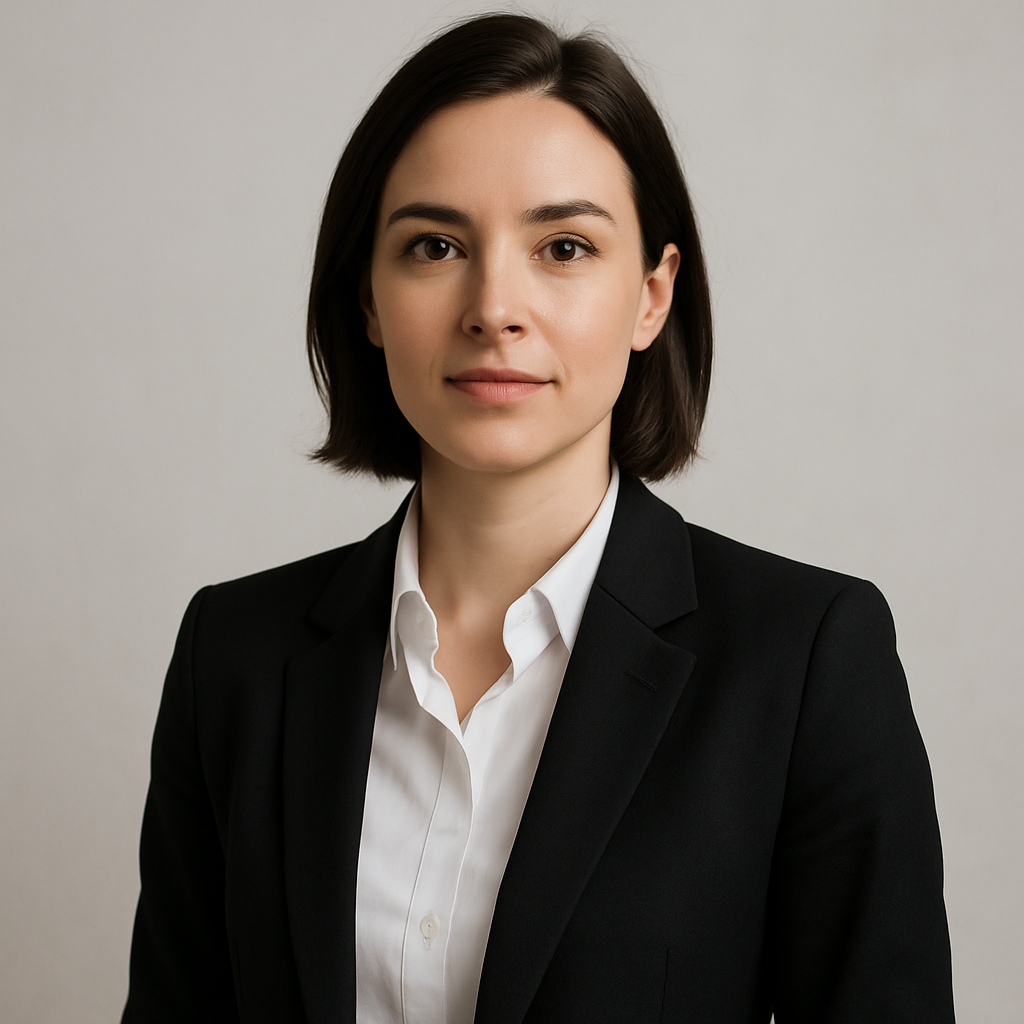
Quick answer: A realistic AI headshot comes down to four prompt elements — natural lighting description, imperfect-but-flattering expression, a grounded background, and a camera/lens callout. Skip any one of these and the result reads as artificial. Get all four right and the image is indistinguishable from a professional studio photo.
Why Most AI Headshots Look Fake
The problem isn't the tool — it's the prompt. When you give an AI image generator a generic description, it defaults to its most averaged, idealized version of "professional." That means flawless skin with zero texture, light hitting both sides of the face with mathematical symmetry, and an expression that's technically a smile but registers as a mannequin.
The fix is specificity. Real photographs have imperfections — a catchlight slightly off-center, the faint texture of skin, a background that's slightly out of focus rather than completely blurred to mush. Your prompt needs to ask for those things explicitly.
The Four Elements of a Realistic Headshot Prompt
1. Lighting (the most important element)
Lighting description is the single variable that separates real-looking headshots from fake ones. Generic prompts produce generic studio lighting. Instead, name a specific light source and quality.
Lighting phrases that work:
soft natural window light from the leftovercast outdoor light, diffused and evengolden hour backlight with a subtle rimsingle softbox, slightly off-axis
Avoid: professional lighting, studio lighting, perfect lighting — these produce the plastic symmetry you're trying to escape.
2. Expression
A slight, natural smile is harder to fake than a full grin — and more convincing. Full smiles require the eyes to match the mouth. When they don't, the image reads as artificial immediately. Ask for something quieter.
Expression phrases that work:
relaxed, natural expressionslight smile, eyes engagedcandid, mid-conversation expressionconfident but approachable, not posed
3. Background
A background that has some context — rather than a pure color gradient — adds realism. A completely uniform background doesn't exist in nature. Even studio backdrops have subtle texture.
Background phrases that work:
blurred indoor office environment, warm tonessoft bokeh of a bright window behind themneutral textured wall, slightly out of focusoutdoor greenery, shallow depth of field
4. Camera and Lens Style
Naming a lens focal length and aperture tells the generator how to render depth and proportion. Faces shot at 85mm look natural. Faces shot at wide angle look distorted. Real photographers know this — your prompt should too.
Camera phrases that work:
85mm portrait lens, f/1.8shot on a full-frame camera, shallow depth of fieldmedium format film look, slight grainSony A7 portrait style, natural color grading
A Prompt Template You Can Copy
Here's a complete prompt built from all four elements:
Prompt: Professional headshot of a man in his early 40s, relaxed natural expression with a slight smile and engaged eyes, soft natural window light from the left creating gentle shadows, neutral textured wall background slightly out of focus, 85mm lens, f/2.0, realistic skin texture, no retouching, natural color grading, photorealistic
Run this and compare it against a simple "professional headshot" prompt. The difference is immediate.
For a faster path to professional results, generate your headshot at ATXP Pics → — describe what you want in plain English and get a realistic result in seconds, with no subscription required.
What to Avoid in Your Prompt
These phrases consistently produce fake-looking results:
- "Perfect" — triggers over-smoothing and idealization
- "Ultra-realistic" — paradoxically produces more artificial results than simply describing real-world details
- "Professional lighting" — defaults to flat, symmetrical studio setups
- "Beautiful" — pushes toward an averaged, uncanny ideal rather than a real-looking person
- "No shadows" — shadows are what give faces dimension; removing them flattens everything
Iterating When the First Result Isn't Right
If your first image is close but not quite there, adjust one element at a time — not everything at once. This is how professional photographers work: change one variable, evaluate, repeat.
- Start with the lighting description — it has the most impact
- If the expression looks stiff, add
candidormid-laughto soften it - If the background looks too blurred or fake, reduce the implied aperture (
f/2.8instead off/1.4) - If the skin looks over-processed, add
natural skin texture, visible pores, no heavy retouching - If the overall image still reads as digital, add
shot on film, slight grain, natural color cast
Because ATXP Pics charges per image — a few cents each, with no subscription — iterating through 5–10 variations costs less than a dollar. Compare that to a professional photographer session, or to a subscription tool that charges you $10/month whether you use it or not.
When an AI Headshot Works Best
An AI headshot that doesn't look fake is a practical tool for specific situations — not a replacement for every professional photo. It works well for:
- LinkedIn profiles and professional directories
- Speaker bios and conference pages
- Internal team pages and company websites
- Social media profile photos
- Placeholder headshots while a real shoot is being scheduled
It's less suited for situations where the image needs to be legally verified as a photograph of a specific person, or for high-profile editorial use where provenance matters.
The difference between an AI headshot that looks real and one that looks generated is almost entirely in the prompt. Nail the lighting, soften the expression, ground the background, and name your lens — and the result is a professional-grade image that holds up to scrutiny.
Create your headshot at ATXP Pics → — pay only for what you generate, no subscription, balance never expires.