Accounting is a trust business. Clients hand over their financial lives and want to see a face that looks competent, approachable, and put-together. Whether you're updating your LinkedIn, joining a new firm's website roster, or launching your own practice, a sharp headshot matters — and this guide shows you exactly how to generate one with AI in under ten minutes.
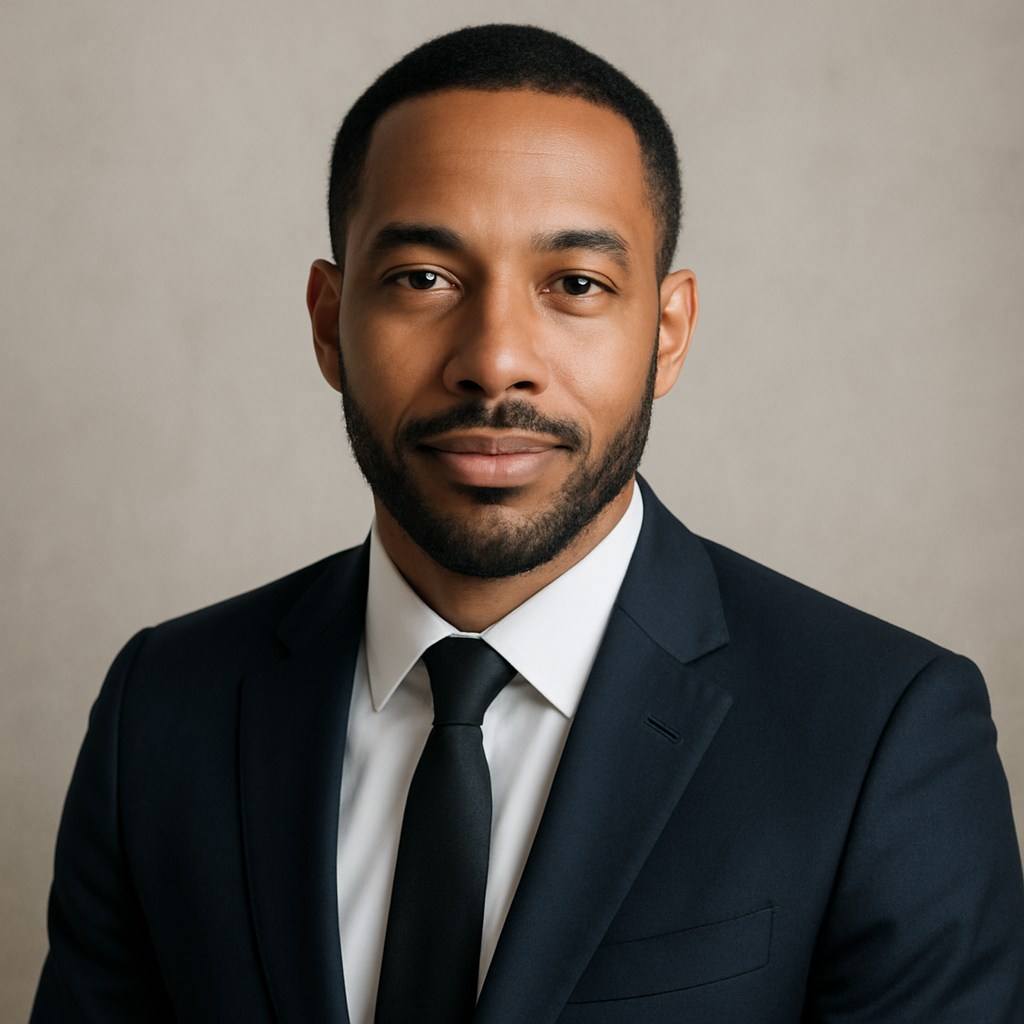
Quick answer: An AI headshot for an accountant should convey trustworthiness and professionalism. Use a prompt that specifies business attire, a neutral background, soft even lighting, and a calm, confident expression. ATXP Pics generates it in seconds — no subscription, no photographer, no session fee.
What Makes a Headshot Work for an Accountant
A great accounting headshot signals credibility before a single word is read. Unlike creative industries where personality and style lead, accounting clients respond to visual cues that say "organized," "reliable," and "serious." That doesn't mean stiff or cold — but it does mean intentional.
Three things drive whether a headshot works in this profession:
- Attire — Conservative professional dress. Suit, blazer, or collared shirt. Solid colors over patterns.
- Background — Neutral and uncluttered. Light grey, off-white, or a softly blurred office environment.
- Expression — Calm and confident, with a slight natural smile. Approachable, not performative.
Everything else — lighting, framing, image quality — flows from getting those three right in your prompt.
How to Write a Prompt That Gets the Right Result
The quality of your AI headshot is almost entirely determined by the specificity of your prompt. Vague inputs produce generic results. Detailed inputs produce images that look like they were planned and art-directed.
Here's a structure that works:
- Subject description — your gender, approximate age, and any relevant physical descriptors you want reflected
- Attire — specific clothing, color, and formality level
- Background — color, texture, or setting
- Lighting — soft, even, professional studio lighting is usually right for headshots
- Expression — calm, confident, slight smile, or whatever suits your personality
- Framing — head and shoulders, or chest-up portrait
Prompt example: "Professional headshot of a man in his late 30s wearing a charcoal grey suit and white dress shirt, no tie. Light grey seamless background. Soft studio lighting, even exposure, no harsh shadows. Calm, confident expression with a slight natural smile. Head and shoulders framing, sharp focus on face."
Try variations — swap the suit color, adjust the background tone, or add glasses. Each generation costs only cents, so experimenting is genuinely cheap.
Step-by-Step: Generating Your Accountant Headshot
The full process takes under ten minutes from your first prompt to a downloaded image. Here's exactly how to do it:
Step 1 — Go to the headshot generator
Head to ATXP Pics' AI headshot generator. No subscription required. You add a small balance when you're ready — unused credits never expire.
Step 2 — Write your prompt
Use the structure above. Be specific about attire and background. The more precise the input, the less time you spend iterating.
Step 3 — Generate and review
Your image appears in seconds. Look at it the way a client would: Does the person look professional? Is the lighting clean? Does the attire match what you'd actually wear to a client meeting?
Step 4 — Iterate if needed
Adjust one variable at a time so you can isolate what's improving the image. Change the background color, adjust the expression descriptor, or try a different clothing description. You're paying a few cents per image, so there's no cost pressure to settle.
Step 5 — Download and use
Save the final image. LinkedIn recommends 400×400 pixels minimum; for firm websites, 800×800 or larger is better. The generated images work for both.
Common Mistakes to Avoid
The most common headshot prompt mistake is being too vague about attire and too specific about things that don't matter. Here's what to watch for:
- Avoid casual clothing descriptors. "Smart casual" is ambiguous. "Navy blazer over a light blue collared shirt" is not.
- Don't ask for a dramatic or moody background. Dark, textured, or busy backgrounds undermine the professional read.
- Skip the lifestyle setting. Prompts like "at their desk" or "in an office" can produce cluttered, unflattering results. A seamless studio background is almost always cleaner.
- Don't over-specify the smile. "Big smile" can look forced in AI portraits. "Slight natural smile" or "calm, confident expression" produces more credible results.
- Avoid accessories that date the image. Ties, pocket squares, and trend-heavy items can make the headshot feel stale faster. Classic and simple ages well.
Accountant Headshot Prompt Variations by Use Case
Different contexts call for slightly different visual tones. Here are three ready-to-use prompt variations:
LinkedIn profile (approachable): "Professional headshot of a woman in her mid-40s wearing a navy blazer over a white blouse. Soft off-white background. Studio lighting, warm tone. Genuine, approachable smile. Head and shoulders portrait."
Firm website (formal): "Corporate headshot of a man in his early 50s in a dark charcoal suit and burgundy tie. Light grey seamless background. Neutral expression, confident and composed. Sharp studio lighting. Chest-up framing."
Solo practice / personal brand (friendly): "Headshot of a woman in her late 30s wearing a light grey blazer over a black top. Blurred light office background. Warm, natural lighting. Relaxed, friendly expression with a genuine smile. Head and shoulders."
Cost Comparison: AI vs. Traditional Headshot Photography
A professional headshot session is a significant commitment — in time and money. Here's how the numbers compare:
| Option | Typical Cost | Turnaround | Retakes / Variations | |---|---|---|---| | Professional photographer | $150–$400 per session | 3–7 days (editing) | Limited by session time | | Stock photo / generic | $0–$20 | Instant | Not personalized | | AI headshot (ATXP Pics) | A few cents per image | Seconds | Unlimited, cheap to iterate |
For an accountant who needs one or two polished headshots and doesn't want a monthly subscription, pay-per-image is the obvious choice. There's no monthly fee, and your balance doesn't expire — so you can come back a year from now and update your headshot without starting over.
Generate your accountant headshot now →
What to Do With Your Headshot Once It's Ready
A single professional headshot can work across every client-facing surface your practice has. Here's where to use it:
- LinkedIn profile photo — the single highest-impact professional image most accountants have
- Firm website bio page — especially important if you're a partner or solo practitioner
- Email signature — adds a personal touch to client correspondence
- Google Business Profile — helps local clients put a face to the name before they call
- CPA directory listings — many state CPA societies and referral directories accept or request a headshot
Update it every two to three years, or whenever your appearance or role changes significantly. With pay-per-image pricing, generating a fresh headshot when the time comes costs almost nothing.
Accounting clients already have to trust you with something personal. A professional headshot doesn't close that deal on its own — but a bad one (or no photo at all) can quietly cost you credibility before the first conversation even starts. A sharp, confident portrait is one of the easiest things to get right.