Professional headshot photographers charge anywhere from $150 to $500 for a session—and that's before you factor in scheduling, travel, and the week-long wait for edited files. If you need a polished photo for your firm bio, LinkedIn, or a court directory listing, an AI headshot for a lawyer gets you there in minutes for a few cents. This guide walks you through exactly how to do it.
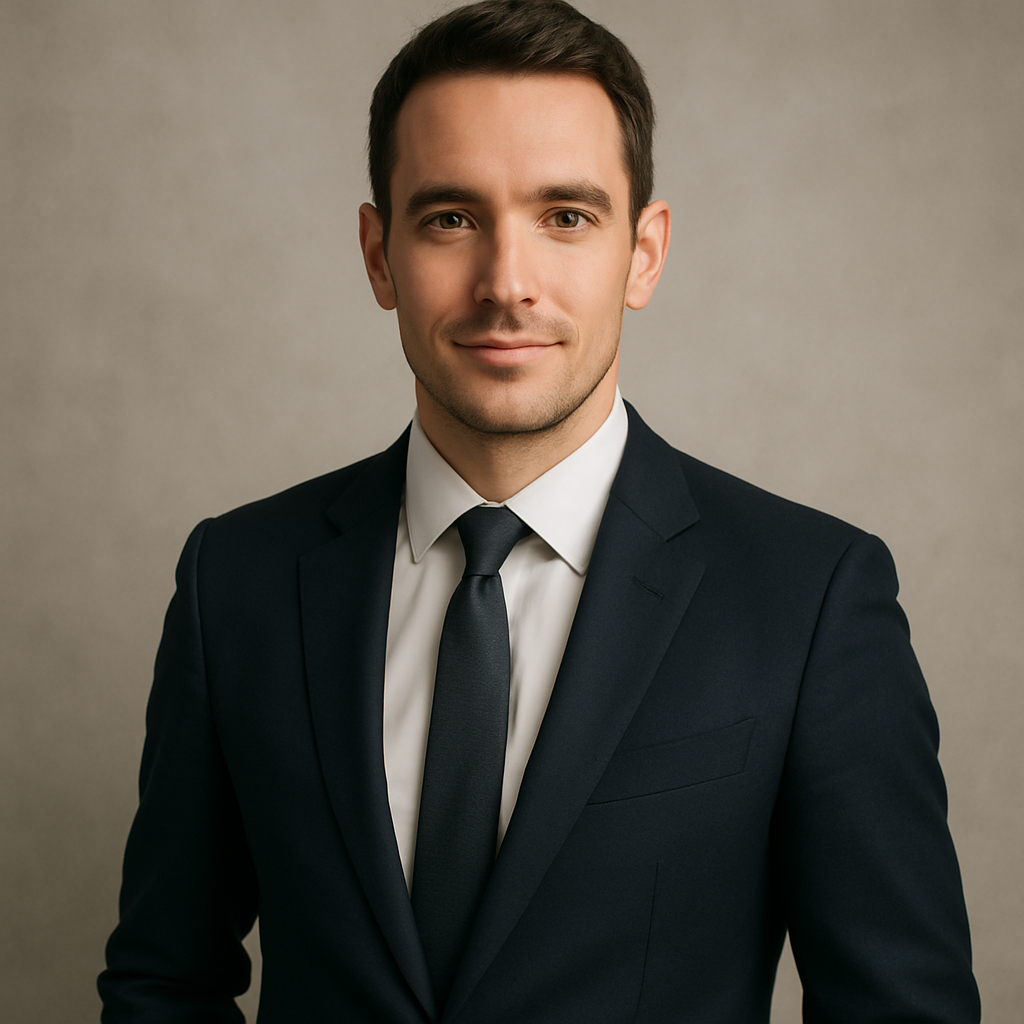
Quick answer: Write a detailed text prompt describing your desired look—attire, background, lighting, and expression. ATXP Pics generates a professional-quality headshot in seconds. No subscription required, no monthly fee, and your balance never expires. Expect to spend a few cents per image, not hundreds of dollars.
Why Lawyers Specifically Benefit from AI Headshots
Lawyers are expected to look credible before a client ever reads a word of their bio. A blurry photo taken at a conference, a cropped group shot, or a years-old photo that no longer looks like you all undermine that credibility. The problem isn't vanity—it's that a bad headshot signals inattention to detail, which is not the message any attorney wants to send.
The traditional fix—booking a photographer—creates its own friction: finding someone good, clearing your schedule, hoping the lighting cooperates, waiting for retouched files. AI removes all of that. You can generate a headshot that looks like it was taken in a proper studio, pick the version that works best, and have it live on your website today.
What Makes a Lawyer Headshot Look Professional
The difference between a generic AI portrait and a credible attorney headshot comes down to four specific elements in your prompt.
- Attire: Dark navy or charcoal suit, white or light blue dress shirt. A tie reads more formal; open collar reads more approachable. Be explicit—"navy three-button suit, white dress shirt, no tie" is better than "professional clothing."
- Background: Neutral backgrounds (soft gray, off-white, or a subtly blurred office bookshelf) keep the focus on the subject. Avoid busy backgrounds that compete visually.
- Lighting: "Soft studio lighting" or "natural window light from the left" signals quality. Harsh overhead light or flash-style lighting makes even a good photo look like a driver's license photo.
- Expression: "Confident and approachable" is the goal. "Slight smile, direct eye contact" gives the generator something specific to work with.
How to Generate Your AI Lawyer Headshot: Step by Step
Step 1: Open ATXP Pics
Go to atxp.pics/headshot. No account setup required before you start experimenting—you only add a balance when you're ready to generate.
Step 2: Write Your Prompt
Be specific. A vague prompt like "professional lawyer photo" will produce something generic. A detailed prompt produces something usable on the first or second try.
Example prompt: "Professional headshot of a 40-year-old male attorney, charcoal suit, white dress shirt, no tie, soft natural lighting, neutral gray background, slight confident smile, sharp focus, photorealistic, high resolution"
Swap out the details to match your own appearance, gender, age range, or preferred style. You can also specify ethnicity, hair color, glasses, or any other relevant detail.
Step 3: Review and Regenerate
Most people find a usable image within two or three generations. If the first result has an issue—wrong background, lighting too harsh, expression off—change one specific element in your prompt and regenerate. Don't rewrite the entire prompt; isolate the variable that's wrong.
Common adjustments:
- Too formal → add "open collar, no tie"
- Background too busy → add "plain light gray background, no texture"
- Expression too stiff → add "warm, approachable expression, subtle smile"
- Lighting looks flat → add "soft key light from the left, subtle shadow"
Step 4: Download and Use
Once you have an image you're satisfied with, download it. It's yours—use it on your firm website, LinkedIn, Avvo, Martindale-Hubbell, court directory listings, or anywhere else a professional photo is expected.
Cost Comparison: AI Headshot vs. Traditional Photography
| Option | Typical Cost | Turnaround | Revisions | |---|---|---|---| | Professional photographer | $150–$500/session | 3–10 days | Limited by contract | | Freelance photographer | $75–$200/session | 2–7 days | Varies | | ATXP Pics (pay-per-image) | A few cents/image | Seconds | Unlimited regenerations | | Midjourney (subscription) | $10/mo minimum | Seconds | Unlimited, but you pay monthly even when idle |
No subscription means you pay only when you actually generate. If you create 5 headshots today and don't need another one for six months, you don't pay anything in the interim. Your balance sits there until you need it.
Common Mistakes to Avoid
The most common mistake is being too vague. Prompts like "professional headshot" or "lawyer photo" don't give the generator enough to work with. Specificity is what separates a usable image from a generic one.
A few other things to watch for:
- Don't skip the background description. An unspecified background often defaults to something overly stylized or inconsistent. Always name it explicitly.
- Don't describe a fictional person. Describe the person you want the image to look like—your approximate age, coloring, and build. The closer the prompt matches reality, the more useful the headshot.
- Don't use it as a final product if the details look wrong. AI-generated images occasionally produce subtle errors in fine details (collar geometry, tie knot asymmetry). Review the image at full resolution before using it professionally.
Generate your AI lawyer headshot →
When an AI Headshot Is the Right Call
An AI headshot makes sense when you need something professional quickly, when you're updating a directory listing and don't want to book a session for one photo, or when you're a solo practitioner keeping overhead low. It's also a practical option for associates at smaller firms that don't provide photography budgets.
It's less suited for situations where a client will be comparing your headshot against an in-person meeting within hours—in those cases, the image needs to resemble you closely enough that you're recognizable. With detailed prompting, AI can get close, but "close" varies by how specific you are.
For most professional use cases—web bios, LinkedIn, directory listings, email signatures—an AI headshot for a lawyer is a legitimate, cost-effective solution that requires no photography session, no waiting, and no monthly subscription.
Ready to generate yours? Describe what you want, get an image in seconds, and pay only for what you use. Start generating at ATXP Pics →