Teacher profile photos show up in more places than most people expect — the school website, LinkedIn, Google Classroom, Remind, parent handouts, and conference bios. Getting a polished headshot shouldn't require booking a photographer and spending hundreds of dollars. This guide walks you through exactly how to generate a professional AI headshot as a teacher, from writing a strong prompt to picking the right image for each platform.
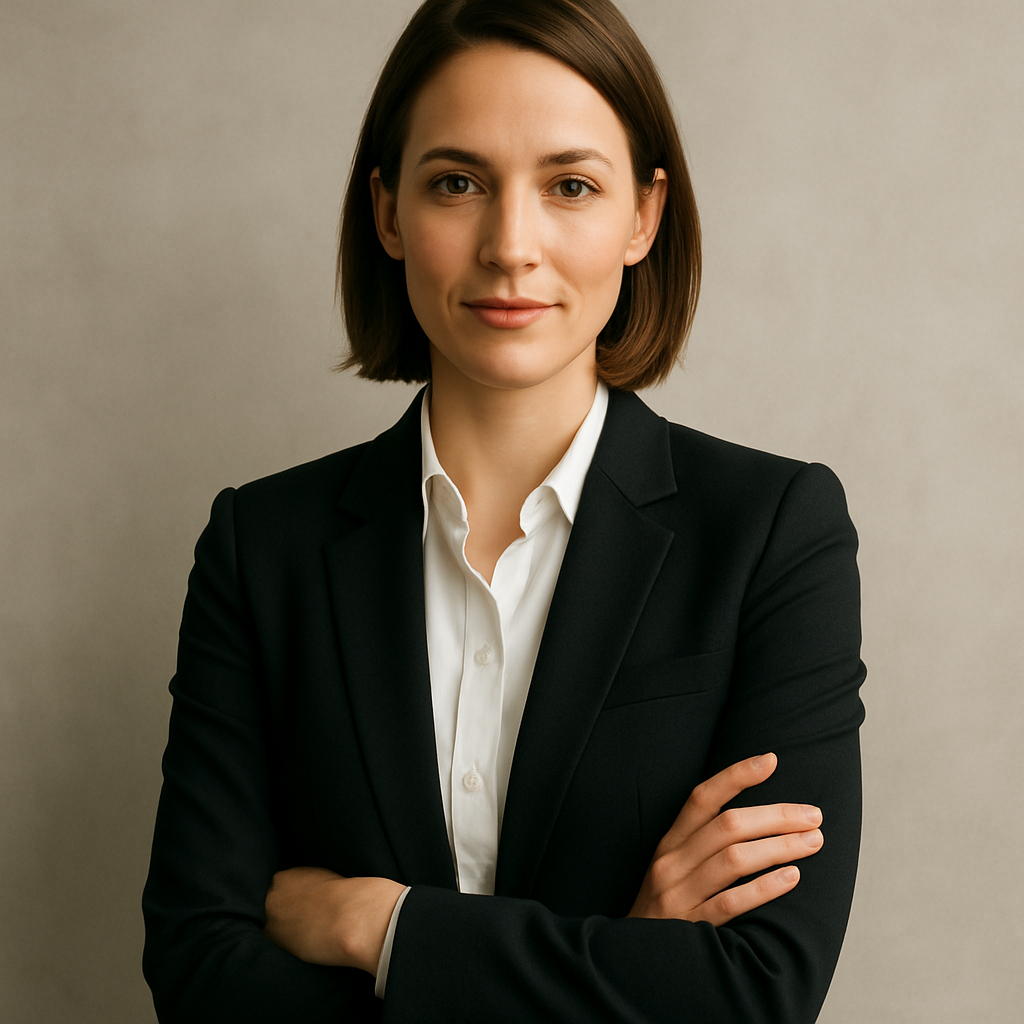
Quick answer: Describe your appearance, clothing, background, and lighting in plain English at ATXP Pics, and you'll have a professional-quality teacher headshot in seconds. No subscription required — you pay a few cents per image, only when you create.
What Makes a Teacher Headshot Look Professional
A professional teacher headshot has four elements: good lighting, a clean background, appropriate clothing, and a natural expression. Get those four right and the image works everywhere — school directory, LinkedIn, conference badge, or parent newsletter.
Here's what to aim for in each area:
- Lighting: Soft, even light from the front or slightly to the side. Avoid harsh shadows under the eyes or chin.
- Background: Neutral colors — white, light gray, soft blue, or a gently blurred indoor setting. Avoid busy patterns or bright colors that pull attention from your face.
- Clothing: What you'd wear on a parent-teacher conference day. A blazer, collared shirt, or smart blouse reads as professional without being stiff.
- Expression: Approachable and composed. A relaxed, natural smile is ideal for most education contexts.
When you describe these elements clearly in your prompt, you get a result that looks intentional — not like a random AI output.
How to Write a Strong Prompt for an AI Teacher Headshot
Your prompt is the difference between a generic image and one that actually looks like a professional photo of you. You don't need photography knowledge — just be specific about what you want.
Use this structure:
- Role and framing: "Professional headshot" or "LinkedIn profile photo"
- Person description: Gender, approximate age, any notable features you want included
- Clothing: The specific type (blazer, button-down, cardigan, etc.) and color
- Background: Color, texture, or setting
- Lighting: Warm studio lighting, natural window light, soft diffused light
- Mood: Approachable, confident, warm, authoritative
Prompt Templates You Can Copy
Elementary teacher, warm and approachable: "Professional headshot of a woman in her early 40s wearing a navy cardigan over a white blouse, soft warm studio lighting, light gray background, friendly natural smile, sharp focus on face, photorealistic"
High school teacher, LinkedIn-ready: "LinkedIn profile photo of a man in his 30s in a charcoal blazer and light blue shirt, clean white background, soft diffused lighting, confident composed expression, photorealistic headshot"
Middle school teacher, school directory style: "Professional school staff headshot of a woman in her late 20s wearing a burgundy blouse, slightly blurred classroom background, warm natural lighting, approachable smile, high resolution"
Swap in your own details — age range, clothing color, background preference. Run two or three variations to have options.
Step-by-Step: Generating Your Teacher Headshot
- Go to ATXP Pics /headshot. No account required to start exploring — no payment until you're ready to generate.
- Write your prompt using the structure above. Be specific. "Professional headshot" alone gives generic results; "Professional headshot of a woman in her mid-30s, teal blazer, soft gray background, warm studio lighting, approachable smile" gives you something you can actually use.
- Generate two or three versions. Adjust the background, lighting description, or expression word between runs. You're paying cents per image, so testing variations is practical.
- Compare results side by side. Look for: eyes in sharp focus, natural skin tones, no odd artifacts around hair or collar, balanced lighting.
- Download your preferred image. Save at full resolution for web uploads.
The whole process takes under ten minutes from first prompt to downloaded file.
Which Headshot Works on Which Platform
Not every platform needs the same image. Here's a quick guide:
| Platform | Best Style | Background | |---|---|---| | School staff directory | Warm, approachable | Neutral color or soft blur | | LinkedIn | Confident, polished | White or light gray | | Google Classroom / Remind | Friendly, clear | Any clean background | | Conference bio | Professional | White or light gray | | Parent newsletter | Warm | Soft indoor setting |
If you're uploading to multiple platforms, generate one version with a clean white background (universally useful) and one with a warmer, slightly warmer background for school-facing contexts. At a few cents per image, generating both is easier than compromising.
Generate your teacher headshot now →
Common Mistakes to Avoid
The most common issue is a prompt that's too vague. "Teacher headshot" produces something generic. Adding specifics — clothing color, background, lighting style, expression — takes the output from stock-photo-generic to genuinely usable.
A few other things to watch for:
- Asking for accessories without describing them clearly. If you want glasses, say "wearing thin-framed rectangular glasses." Vague references produce inconsistent results.
- Skipping the lighting instruction. Lighting shapes how professional the image feels. "Soft studio lighting" or "warm window light" makes a real difference.
- Accepting the first result. Run two or three variations. Small prompt changes — swapping "confident expression" for "warm, approachable smile" — produce noticeably different images.
- Uploading a low-contrast image to a platform with a white background. If your headshot has a white background and you're uploading to a site with a white page, you'll lose the visual boundary. Add a soft drop shadow in your description, or choose a very light gray background instead.
The Cost Compared to Hiring a Photographer
A single-session professional headshot photographer typically charges $150 to $400, sometimes more in larger cities. That makes sense if you need a full portfolio or a high-stakes executive photo.
For a teacher who needs a clean profile photo for the school website and LinkedIn, the math looks different:
| Option | Typical Cost | What You Get | |---|---|---| | Professional photographer | $150–$400 | 1–2 hour session, edited finals | | ATXP Pics (pay-per-image) | A few cents per image | Instant results, unlimited variations | | Subscription AI tool | $10–$30/month | Charged every month, even months you don't create |
With ATXP Pics, your balance never expires — so if you generate a few headshots today and don't need another one until next school year, you're not paying monthly fees in between.
A professional AI headshot for a teacher doesn't require a photographer, a studio, or a subscription. Describe what you want clearly, run a few variations, and you'll have a polished profile photo that works for every platform your school uses — in the time it takes to write a few sentences.