You need a professional headshot but don't have the time or budget for a photographer. A realistic AI headshot generator can get you there in seconds — as long as you know how to describe what you want. This guide walks you through exactly how to write prompts that produce portraits that actually look like you.
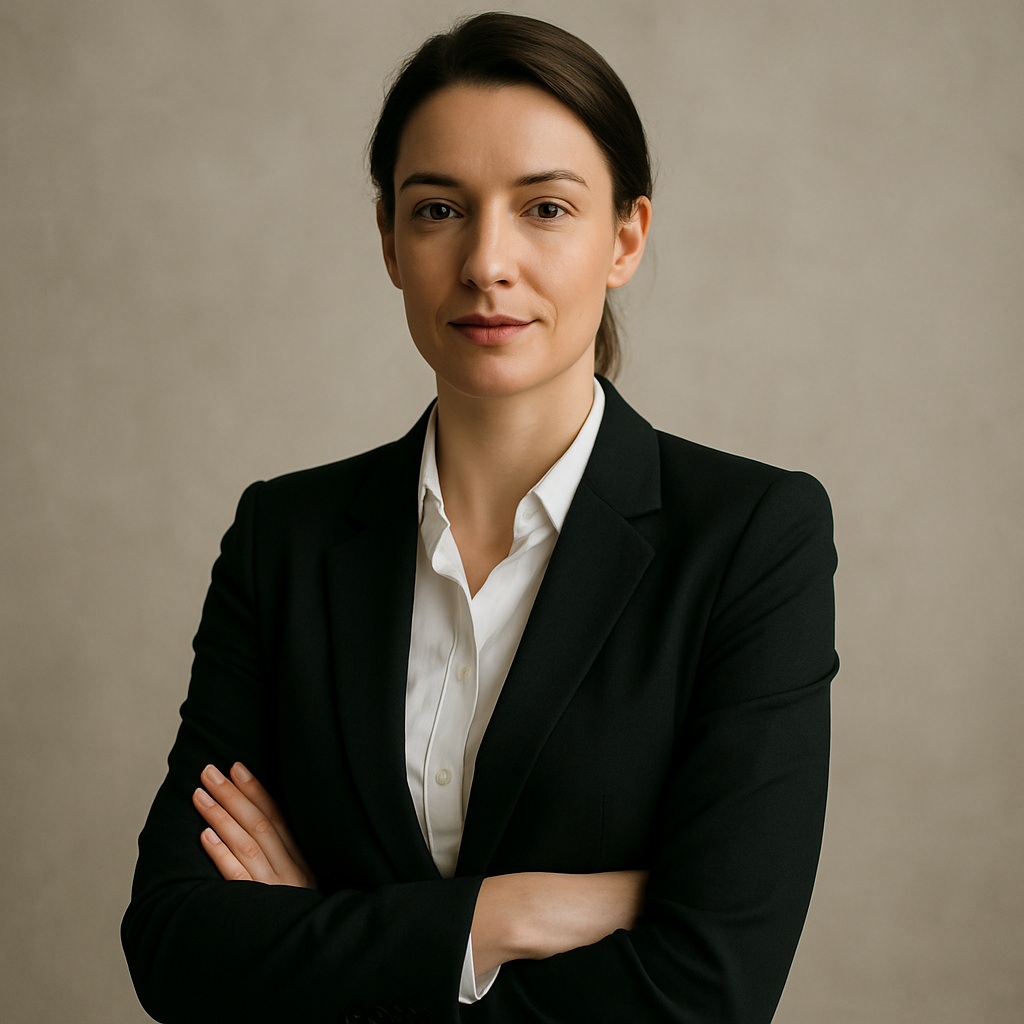
Quick answer: Describe your physical features in specific detail — hair color and length, skin tone, eye color, face shape — then layer in setting, lighting, and style. The more precise your prompt, the closer the output will be to your actual appearance. No photo upload required.
What Makes an AI Headshot Look Realistic
Realism in a headshot comes down to three things: specificity, lighting, and context. Vague prompts produce generic faces. Detailed prompts produce portraits that feel like a real person was photographed by a real photographer.
The most common mistake is stopping at "a professional headshot of a woman with brown hair." That description fits millions of people. You need to go further:
- Hair: color, length, texture (straight, wavy, curly), and style (pulled back, loose, side-parted)
- Skin tone: use descriptive terms like warm olive, deep brown, fair with cool undertones, medium tan
- Eye color and shape: blue, hazel, dark brown, almond-shaped, wide-set
- Age range: early 30s, mid-40s, late 20s
- Facial features: strong jawline, soft features, high cheekbones, full lips
Every detail you add moves the result closer to you and further from a stock photo.
How to Write a Prompt Step by Step
Start with the subject, then build outward toward the setting and mood. Follow this structure every time:
- Subject description — Who is in the image? Describe physical features in the order they appear naturally: face shape, skin tone, hair, eyes, expression.
- Clothing and framing — What are they wearing? How is the shot framed? "From the shoulders up" or "chest up, slightly off-center" both work well.
- Background — Simple backgrounds read as professional: neutral grey, soft white, blurred office interior, muted navy.
- Lighting — Lighting determines mood. "Soft studio lighting" is clean and corporate. "Natural window light from the left" feels warm and approachable. "Rembrandt lighting" adds depth for creative fields.
- Style and finish — End with the overall feel: "professional LinkedIn headshot," "editorial portrait," "corporate executive photo," "warm and approachable."
Real Prompt Examples You Can Copy
Use these as starting points and swap in your own details.
For a LinkedIn or corporate headshot:
A professional headshot of a woman in her early 40s with warm olive skin, dark brown wavy hair pulled back loosely, and hazel eyes. She is wearing a navy blazer over a white blouse. Shot from the shoulders up, slightly off-center. Neutral grey background. Soft studio lighting. Sharp focus, photorealistic, professional LinkedIn headshot.
For a creative or editorial portrait:
A professional portrait of a man in his late 20s with fair skin, short auburn hair, light freckles, and blue-green eyes. He is wearing a grey crew-neck sweater. Framed from the chest up. Blurred warm-toned interior background. Natural window light from the left. Relaxed expression, slight smile. Photorealistic, editorial style.
For a more expressive, personality-forward headshot:
A headshot of a non-binary person in their mid-30s with deep brown skin, natural coily hair, and dark brown eyes. They are wearing a mustard yellow turtleneck. Shot from the shoulders up, centered. Soft white background. Bright, even lighting. Confident and warm expression. Photorealistic, modern professional portrait.
Generate your first headshot now — try the AI portrait generator →
Common Mistakes That Make Headshots Look Generic
The fastest way to get a generic output is to under-describe the subject and over-rely on the word "professional." Here's what to avoid:
Mistake 1: No physical specifics
"A professional headshot of a man" tells the generator almost nothing. Add age range, skin tone, hair color, eye color, and expression at minimum.
Mistake 2: Busy or distracting backgrounds
Backgrounds with hard edges, obvious patterns, or bright colors pull attention from the face. Stick to neutral, blurred, or softly lit backgrounds.
Mistake 3: Skipping lighting instructions
Without lighting guidance, the generator chooses for you — and the result can feel flat or dramatically over-lit. Name the lighting style explicitly.
Mistake 4: Forgetting the expression
Expression carries as much weight as any technical detail. "Confident and approachable," "relaxed, slight smile," or "serious, direct eye contact" all produce meaningfully different results.
Mistake 5: One-and-done
Generate four or five variations of the same prompt with small adjustments — different lighting, a slightly different expression, a different background. The best headshot is rarely the first one.
How ATXP Pics Compares for Headshots
Generating headshots on ATXP Pics costs a few cents per image with no monthly subscription — which means you can run five variations today and come back in three months without paying anything in between.
Compare that to a subscription-based tool like Midjourney:
| Scenario | Midjourney Basic ($10/mo) | ATXP Pics (pay-per-image) | |---|---|---| | 5 headshots, one month only | $10.00 ($2.00/image) | ~$0.25–$0.50 total | | 20 headshots across 3 months | $30.00 ($1.50/image) | ~$1.00–$2.00 total | | No images one month | $10.00 (charged anyway) | $0.00 |
If you need a headshot refresh every few months — not a daily creative habit — paying per image is straightforwardly cheaper. Your balance never expires, so there's no pressure to "use it or lose it."
What to Do With Your Headshot Once You Have It
A good AI headshot works anywhere a real photograph would:
- LinkedIn profile — The most common use case. A clean, professional portrait increases profile views significantly.
- Email signature — A consistent, professional image builds trust in every message you send.
- Speaker bio or author page — Useful if you contribute to publications, speak at events, or maintain a personal website.
- Team page — Generate consistent-style headshots for an entire team without scheduling a photographer.
- Social media profiles — A polished portrait works on X, GitHub, Substack, or anywhere you maintain a public presence.
Get Your Realistic AI Headshot in Seconds
A realistic AI headshot generator works best when you give it something to work with. Describe your features specifically, choose a clean background, name your lighting, and generate a handful of variations. The whole process takes less time than scheduling a photographer.